Classifier Pipeline
Overview
The Classifier Pipeline assigns one or more predefined labels to documents based on their content.
It is used to:
- Categorize documents
- Route documents into different workflows
- Add semantic labels for filtering and decision-making
This pipeline is typically applied after parsing and tokenization.
What It Does
- Accepts text documents as input
- Evaluates content against configured labels
- Attaches classification results to document metadata
Classified documents can be:
- Filtered
- Routed to different pipelines
- Used in workflows and agents
info
At least one label must be configured for this pipeline to function.
Using the Classifier Pipeline
Add to DocProcessorAgent
- Open Pipelines
- Select Classifier Pipeline
- Drag and drop it into DocProcessorAgent
- Connect it after the Parser or Tokenizer Pipeline
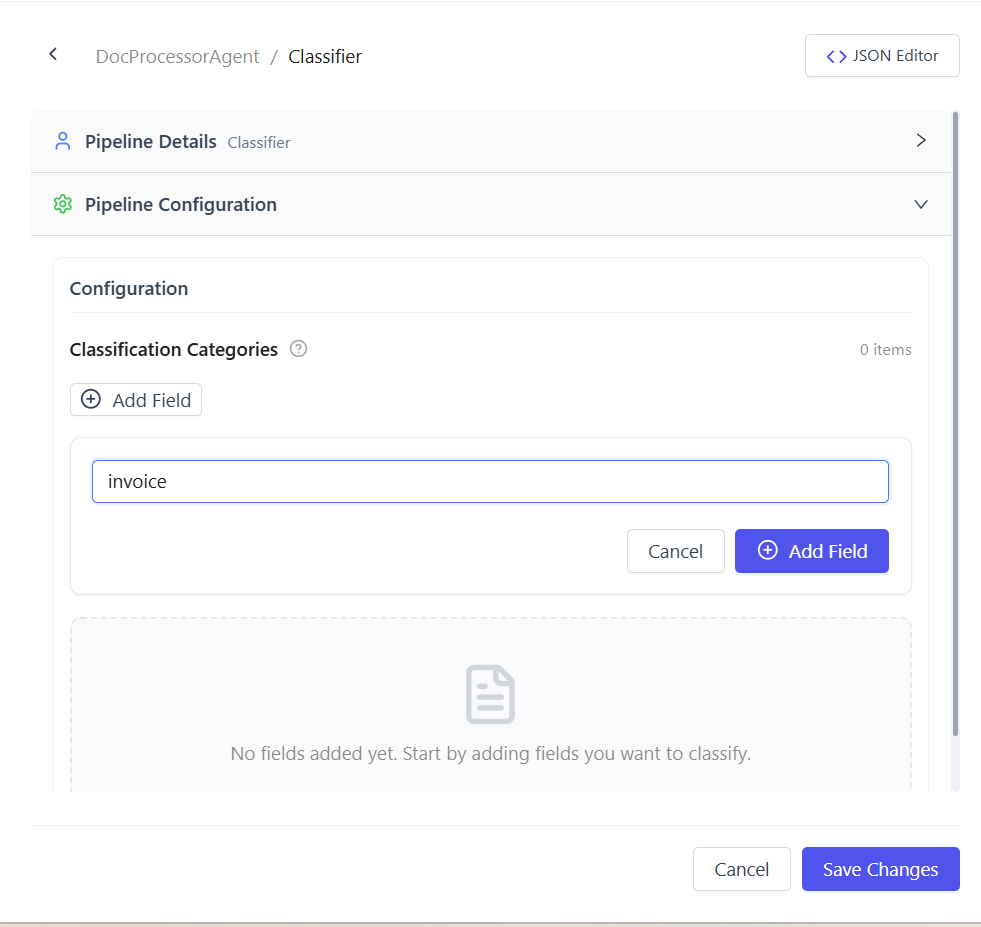
Configure Labels
Define the set of labels used for classification.
Example labels:
- Invoice
- Receipt
- Contract
- Policy
- Other
The pipeline compares each document against these labels and determines the best match.
Output
- Documents include classification results in metadata
- Each document receives one or more labels
- Documents continue through the pipeline unchanged except for metadata
Common Use Cases
- Auto-categorizing uploaded documents
- Routing documents to specific pipelines
- Enabling label-based filtering and search
- Supporting decision-based workflows
Output can be connected to:
- Writer Pipeline
- Workflow nodes
- Conditional routing logic
Summary
The Classifier Pipeline assigns semantic labels to documents, enabling automated routing, filtering, and processing in document-based workflows.