Email Processor Pipeline
Overview
The Email Processor Pipeline processes parsed email documents and stores them in a vector-enabled document store for search and retrieval.
It takes output from the Email Parser Pipeline, performs cleaning, tokenization, splitting, embedding, and indexes both email content and attachments.
This pipeline makes emails searchable, retrievable, and usable in RAG workflows.
What It Does
- Accepts parsed email documents as input
- Cleans content (whitespace, empty lines, ASCII filtering)
- Splits documents into chunks (words, sentences, passages)
- Generates embeddings using a configurable model
- Indexes:
- Email content into a content index
- Attachments into a separate attachments index
Using the Email Processor Pipeline
Add to Agent
- Go to Pipelines
- Select Email Processor Pipeline
- Drag it into DocProcessorAgent
- Place after the Email Parser Pipeline
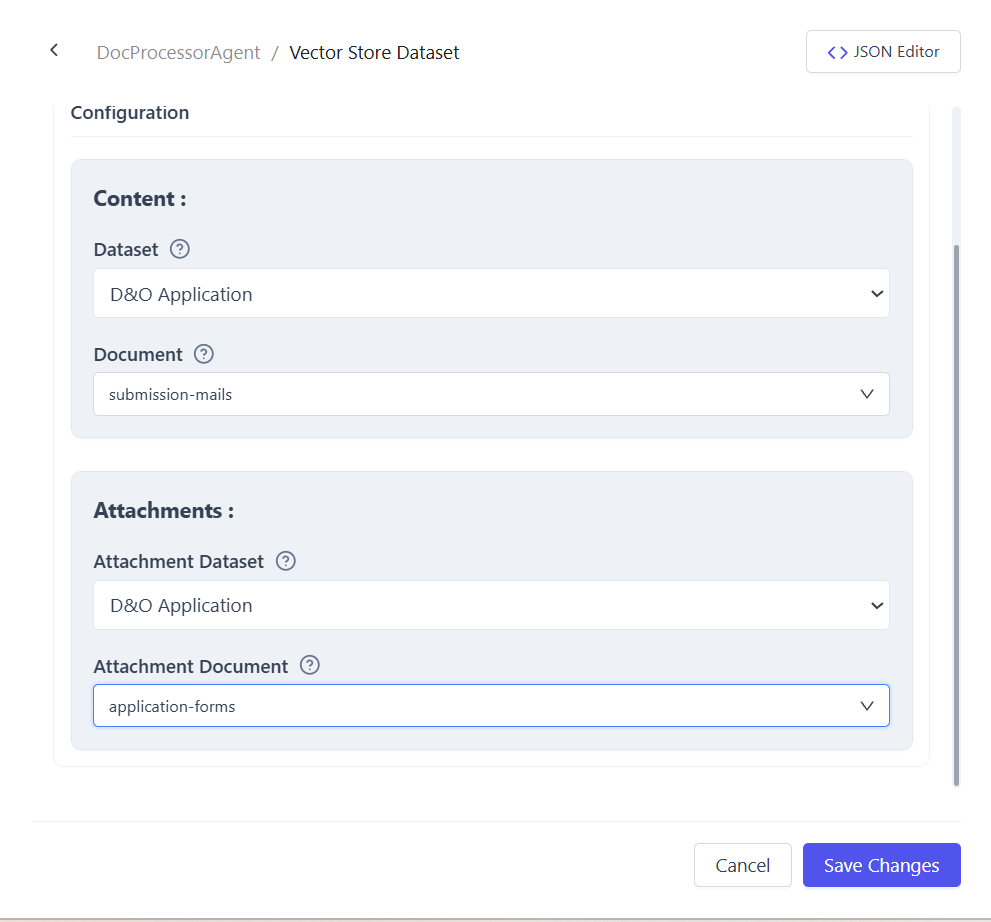
Configure Dataset and Indices
Configure the agent dataset with the following:
- Content index for email body and metadata
- Attachments index for email attachments
- These indices are selected in the dataset configuration and used by the pipeline to write processed data
Input & Output
- Input: Parsed email documents from the Email Parser Pipeline
- Output: Embedded and indexed documents and attachments; errors reported for duplicates or runtime issues
Pipeline Flow
- Email Parser Pipeline extracts content and attachments
- Email Processor Pipeline:
- Cleans content
- Splits into chunks
- Generates embeddings
- Writes to configured indices
- Indexed data becomes available for search and retrieval
Common Use Cases
- Indexing enterprise inboxes for semantic search
- Preparing email data for RAG-based agents
- Storing attachments separately for structured retrieval
Summary
The Email Processor Pipeline enables end-to-end preparation of email data for vector search and intelligent querying.
It ensures email content and attachments are fully searchable and ready for downstream workflows.