Workflow Assistant Agent
Overview
The WorkflowAssistantAgent executes a selected workflow.
It can run in playground/chat mode or in deployed mode, providing workflow execution and visualization.
note
- In playground/chat mode, the workflow runs using user text input and streams progress in chat.
- When deployed, a dataset and datasource type must be selected. documents from the datasource become the workflow input, and execution can be visualized in the Workflow Run UI.
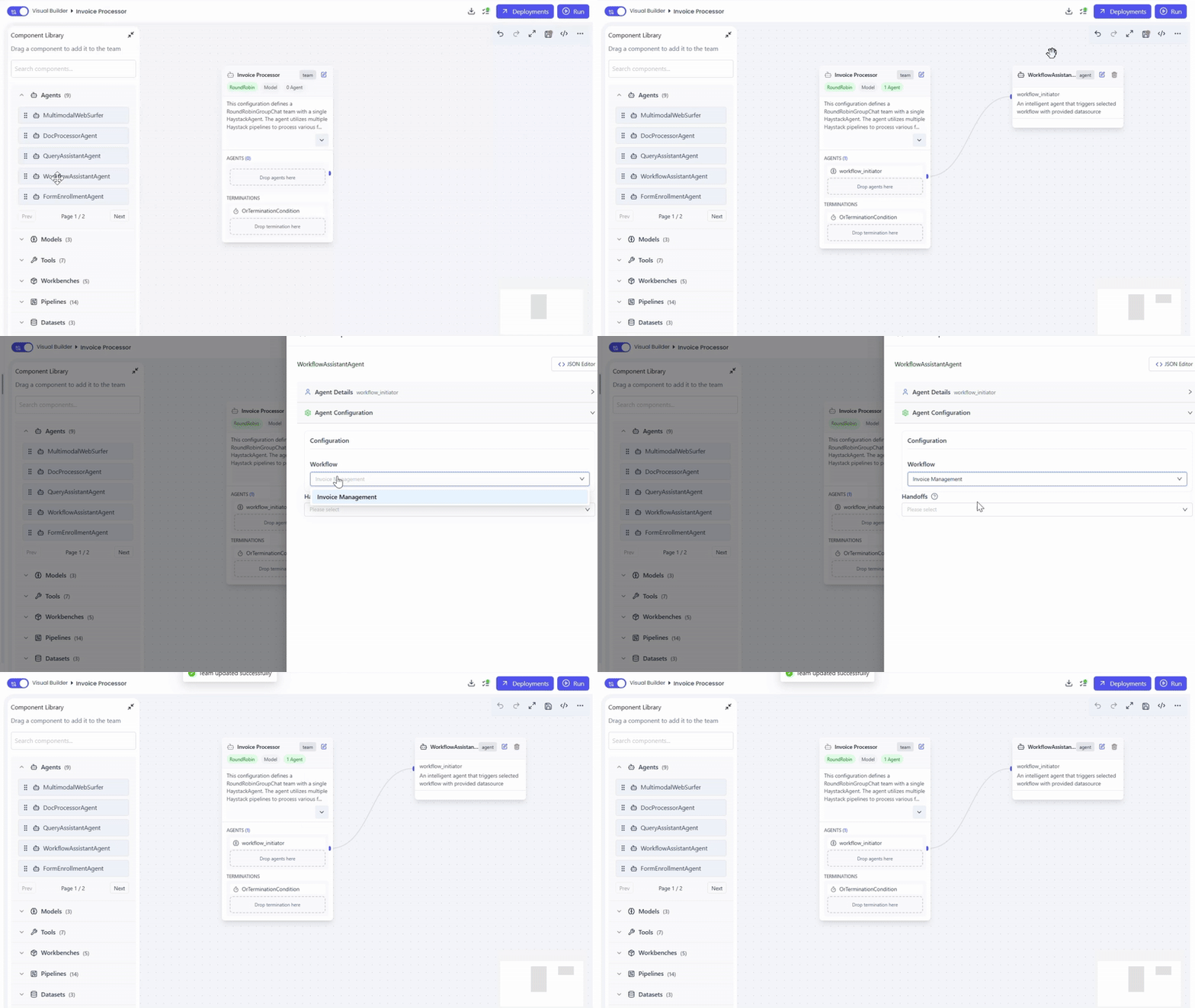
Adding the Workflow Assistant Agent
Actions
- Open Team Builder
- Create or select an agent team
- Drag and drop WorkflowAssistantAgent into the canvas
Configuring the Workflow
Required Settings
- Agent Name – Display name for the agent
- Description – Brief summary of the agent’s purpose
- Workflow – Select the workflow to execute
Deploying the Team (Optional)
Actions
- Select the Dataset
- Choose the Datasource Type
- Click Deploy to run the workflow on dataset documents
Capabilities and Use Cases
Key Capabilities
- Executes workflows on demand
- Supports real-time workflow execution visualization
Common Use Cases
- Trigger automated business processes
- Workflow-driven document processing
Summary
The WorkflowAssistantAgent enables seamless workflow execution and monitoring in both chat/playground and deployed environments, providing visual feedback and integration with datasets and pipelines.