Form Enrollment Agent
Overview
The FormEnrollmentAgent generates structured form definitions from documents containing questions and answers, such as insurance D&O submissions, renewals, or claim forms.
It parses documents, extracts sections, questions, sub-questions, and metadata, and stores the structured form data in a Vector Store index for further processing.
In chat mode, users can upload a document directly.
When deployed, the agent processes files from the selected dataset.
How It Works
After a document is processed:
- Forms are not automatically saved to the selected index.
- The agent presents the extracted sections and questions for user review.
- Users can:
- Edit section titles or question text
- Remove sections or questions
- Add new sections or questions
- Assign or modify weightage for questions (used later by the Extractor).
- In chat mode, this occurs immediately on the interface.
- When deployed, the user who created the team receives a notification for approval.
- The approval screen allows the same edits as in chat mode before saving the final form definition to the dataset.
- If a form definition with the same identifier already exists, the agent will not save it and will show an "already exists" error.
After saving, enrolled forms can be viewed using the FormDefinitions UI component.
Go to the FormDefinition UI Component page to learn how to configure and view forms.
Intended Usage
The FormEnrollmentAgent and FormDefinitions component are primarily designed to define structured questions once and reuse them across similar documents.
This is especially useful for scenarios such as insurance D&O processing, where multiple documents follow the same structure but contain different answers.
How It Fits in a Workflow
- The FormEnrollmentAgent creates a structured form definition (sections, questions, sub-questions).
- Saved form definitions can be retrieved .
- Retrieved form definitions can be passed to an Extractor pipeline within a workflow.
- The retrieved form definition can then be:
- Passed to an Extractor pipeline in a workflow
- Used to extract answers from similar documents that follow the same format
- This avoids redefining questions for every document and ensures consistent extraction.
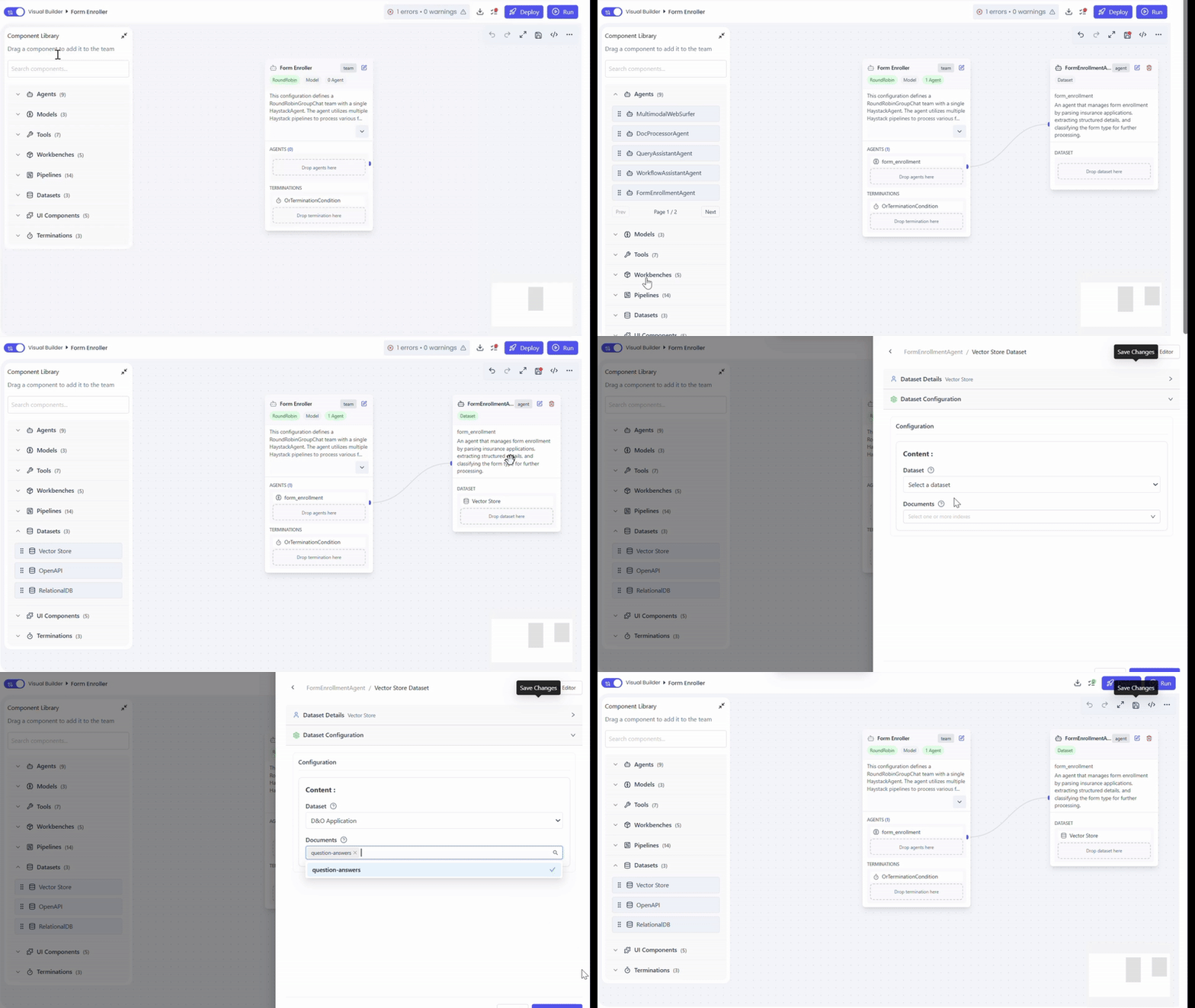
Adding the Agent to a Team
Actions
- Open Team Builder
- Create or select a team
- Drag and drop FormEnrollmentAgent into the canvas
Connecting a Vector Store Dataset
Required Configuration
- Drag and drop a Vector Store Dataset into the agent
- Select the index where structured form data should be saved
- Ensure the dataset contains a single document source
Deploying the Team (Optional)
- Select Dataset
- Choose Datasource Type: File
- Deploy the team to automatically process dataset files
Common Use Cases
- Insurance D&O submission forms
- Policy renewal applications
- Claim intake forms
- Any document containing structured questions and answers
Summary
The FormEnrollmentAgent converts unstructured insurance documents into validated, structured form definitions and stores them in a Vector Store index, supporting both interactive chat-based uploads and dataset-driven deployments.