Doc Processor Agent
Overview
The DocProcessorAgent is a document-focused agent that processes, analyzes, and transforms files by routing them through configurable pipelines.
It is designed for document-centric workflows such as invoice processing, email parsing, OCR-based extraction, classification, and structured data generation—without writing custom code.
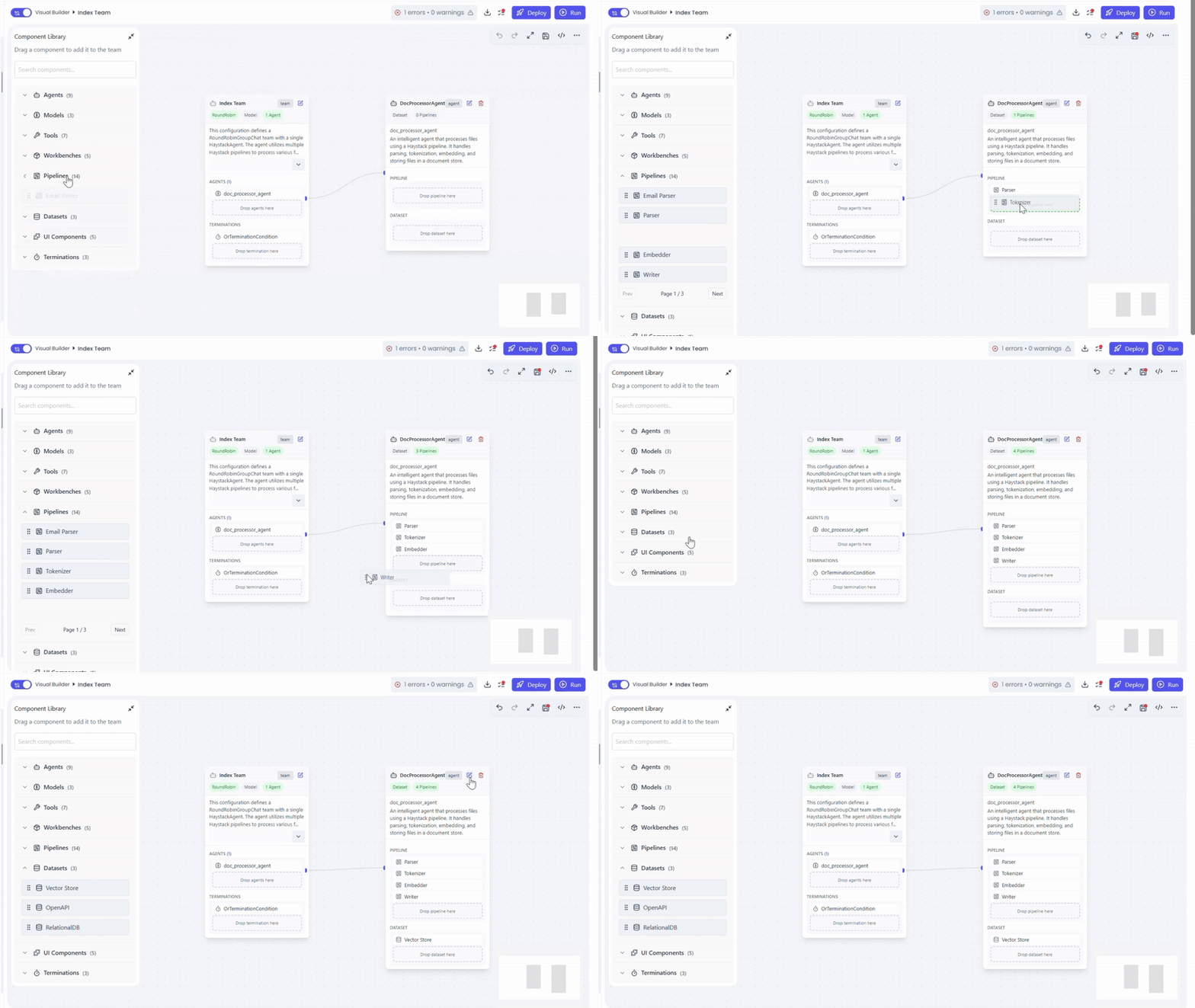
Adding the Agent to a Team
To use the DocProcessorAgent:
- Open Team Builder
- Drag and drop DocProcessorAgent onto the canvas
Attaching Processing Pipelines
The DocProcessorAgent operates by executing one or more pipeline components in sequence. Each pipeline performs a specific document task like parsing, tokenize, classify, extract etc
Supported Pipelines
- Parser Pipeline
- Tokenizer Pipeline
- Embedder Pipeline
- Writer Pipeline
- Email Parser Pipeline
- Classifier Pipeline
- Extractor Pipeline
- Router Pipeline
How Pipelines Work
- Pipelines are dragged and dropped onto the DocProcessorAgent
- Components execute top → bottom, in the order they are arranged
- Each pipeline can be configured independently
- Output from one pipeline becomes input to the next
This modular design makes complex document workflows easy to build and maintain.
For details on what each pipeline does and how it connects to datasets, refer to the Pipelines documentation.
Connecting a Dataset
To provide documents and context, the agent requires a compatible dataset.
Supported Datasets
- Vector Store Dataset
- Any dataset compatible with the attached pipelines
Dataset Role
- Supplies source documents (files,metadata)
- Enables filtering, indexing, and retrieval during processing
- Acts as both input source and storage layer, depending on pipeline configuration
The dataset is attached directly to the DocProcessorAgent.
Configuration and Execution Behavior
The agent’s behavior is defined entirely by:
- The pipelines attached to it
- The order in which those pipelines are arranged
- The dataset providing document context
Pipeline components attached to DocProcessorAgent are executed top to bottom in the order they are added. Ensure each component is arranged according to the intended processing flow (for Indexing example: Parser → Tokenizer → Embedder → Writer).
Capabilities and Use Cases
Key Capabilities
- Pipeline-driven document processing
- Structured and unstructured data handling
- Context-aware transformations using datasets
- Scalable, reusable document workflows
Common Use Cases
- Invoice and receipt processing
- Email content extraction
- OCR-based document parsing
- Document embedding and indexing
- Classification and routing of incoming files
Summary
The DocProcessorAgent serves as the backbone for document automation within agent teams.
By combining modular pipelines with dataset-backed context, it enables robust,
scalable document workflows without custom implementation effort.